EQ is one of the primary tools in the engineer’s arsenal. While there are fantastic paid EQ plugins like the ProQ series from FabFilter, and the Waves Audio and UA stuff, it is also a category with a rich freeware inventory.
So, whether you need something surgical for removing unwanted resonances, or something with some mojo for additive EQ, here are our picks for the best free EQ plugins.
Best free EQ plugin overall: Sonimus SonEQ
Best free EQ plugin overall
Sonimus SonEQ
It only offers 3 bands, but this is a great Swiss army knife EQ.
Pros
- Input and output gain
- Boost and attenuation for low end
- Frequency selection for each band
- Drive control for additional harmonics
- Low and high-pass filters
Cons
- Only 3 primary EQ bands
- Doesn't work on stereo sources
Download from
We may earn a commission from these links.
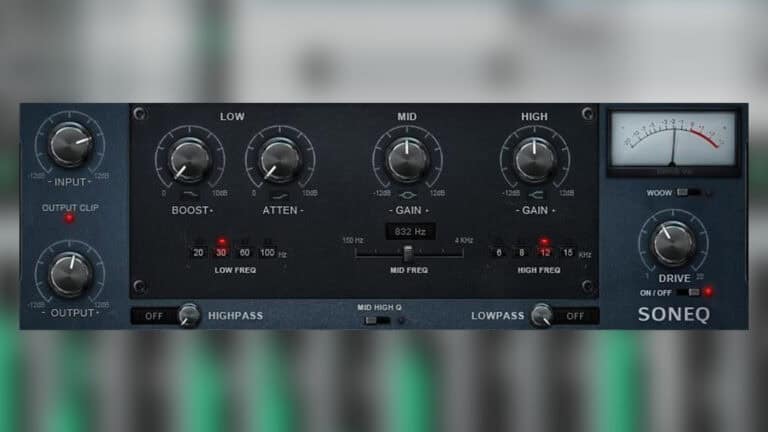
This 3-band (really five with the cut filtering) EQ truly features some of the best elements of different types of equalizers to achieve its unique and musical tone.
The high/low bands are shelving filters with four frequency points. The mid-band is sweep-able from 150Hz to 4kHz and utilizes a bell curve. A useful drive control adds in more harmonic color and saturation, and the output gain section has a clipping LED.
SonEQ is a really unique EQ that comes in a variety of 64/32-bit formats for both Windows and Mac.
Best Pultec EQP-1A free EQ plugin: Analog Obsession Rare
Best Pultec EQP-1A free EQ plugin
Analog Obsession Rare
An accurate free version of the vaunted Pultec EQP-1A.
Pros
- Selectable frequency points for low and high end
- GUI looks authentic to hardware
- Easy to dial in
- Can oversample 4x
Cons
- Only 2 EQ bands
- It works differently than other EQs, so there's a learning curve
Download from
We may earn a commission from these links.
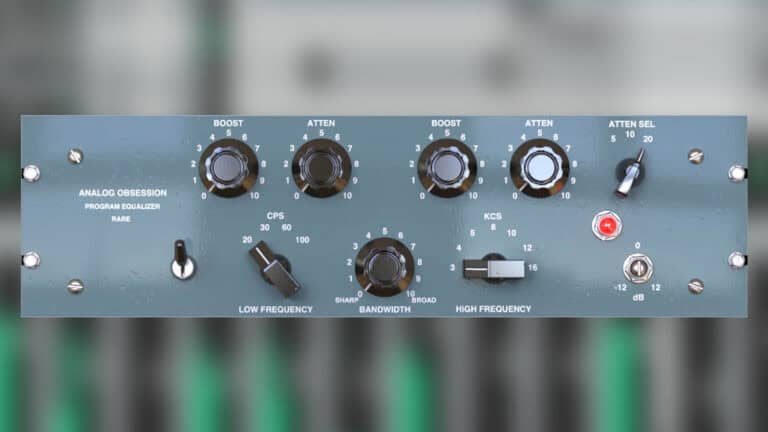
Rare might be the rarest of all things – a superbly accurately-modeled plugin take on the Pultec EQP-1A. It features two bands over low and high frequencies, with a global bandwidth control.
The bypass switch circumvents the EQ and harmonic generation aspects of the “circuit”. Rare is available in 64/32-bit VST and AU plugin formats.
Best Pultec MQ5 free EQ plugin: Ignite Amps PTEq-X
Best Pultec MQ5 free EQ plugin
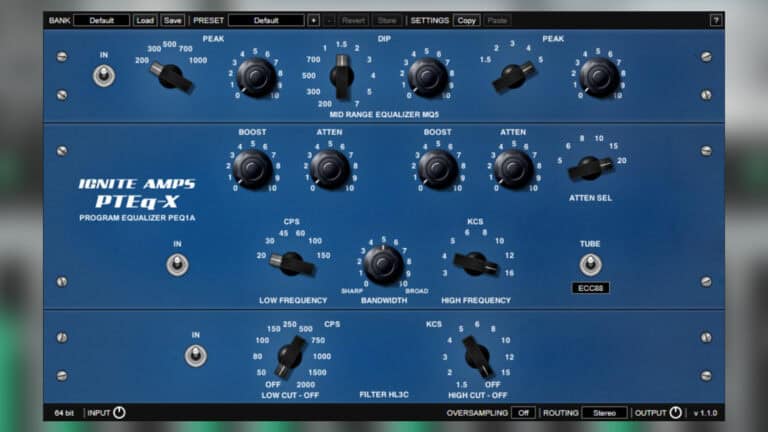
Ignite Amps PTEq-X
One of the best free Pultec plugins emulates three different hardware EQs.
Pros
- Emulates 3 styles of Pultec hardware
- Models four different types of vacuum tubes
- Includes frequencies the hardware EQP-1A doesn't
- Works on mono or stereo
- 64-bit floating point processing
Cons
- Steep learning curve if you don't understand a Pultec
Download from
We may earn a commission from these links.
Ignite Amps went all-in on painstakingly recreating one of the most beloved types of equalizer – the Pultec. This freeware plugin features three different models that include emulations of the MQ5, EPQ-1A, and HL3C models.
The adjustable tube function is a welcome addition to the EPQ-1A emulation that adds additional harmonics. You can oversample it as well a use it in mono or stereo modes.
Each unit has individual power switches so you’re free to choose which ones are in or out of the signal.
Best Maag-style free EQ plugin: Sky Blue EQ4
Best Maag-style free EQ plugin
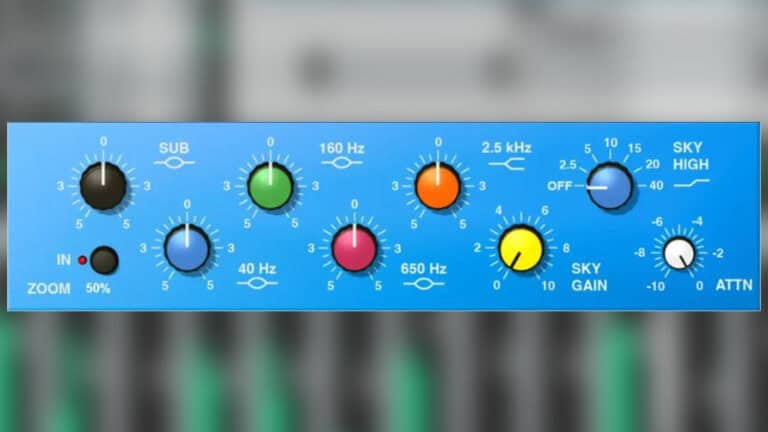
Sky Blue EQ4
An accurate model of the Maag EQ4 with the famed Air Band.
Pros
- Free model of the Maag EQ4M
- 6 semi-parametric frequency bands, including model of presence Air Band
- Output attenuation
Cons
- Not best choice for surgical moves
Download from
We may earn a commission from these links.
Maag Audio makes some of the best EQs in pro audio, whether it’s their plugins or hardware.
There are six bands that cover sub frequencies, low end (40Hz), and midrange (160Hz, 650hz, 2.5kHz). But the real magic happens in the Sky High range, a take on Maag’s Air Band.
It’s switchable over six different frequency areas in the midrange and presence end and even has settings for 20kHz and 40kHz! Output attenuation keeps your gain staging in check.
If you’re looking for a free semi-parametric EQ that’s useful for multiple applications Sky Blue’s EQ4 is it.
Best surgical free EQ plugin: Audio Teknikk Equilibre
Best surgical free EQ plugin

Audio Teknikk Equilibre
The best free alternative if you prefer GUIs like FabFilter’s ProQ series.
Pros
- 8 frequency bands
- Input gain and saturation sliders
- Pre and post EQ visualization
- RMS and peak metering
- Mono, stereo, M/S modes
Cons
- No output gain control
Download from
We may earn a commission from these links.
This is pretty much as close to the popular FabFilter ProQ as you’ll find in freeware. It uses a double precision EQ and oversampling modality to achieve its filtering. It has an easy-to-navigate, vibrant interface.
There are eight fixed bands with high/low pass and shelf and four peak bands for the midrange. Each band has mid, side, or stereo processing options, opening it up to be used on channels, busses, or even the master!
Perhaps the coolest feature is the saturation slider. This helps to introduce a little analog color for more tonal variety. It displays peak and RMS values and has an input gain so you can nail gain staging on the way into the plugin.
Best EQ/compressor hybrid free EQ plugin: TDR Nova EQ
Best EQ/compressor hybrid free EQ plugin
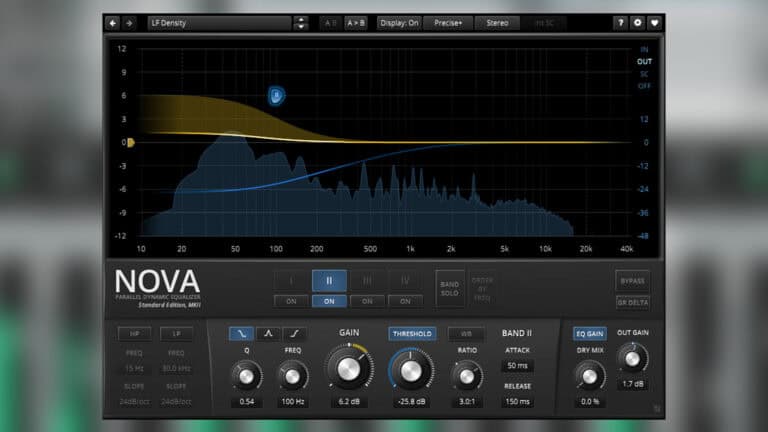
TDR Nova EQ
A complex hybrid of EQ and compression with multiple additional features.
Pros
- Parametric and dynamic EQ
- Multi-band and wideband compression
- Full dynamics section for each band
- Dry signal blend
Cons
- Not the best choice if you want simple
- Only 4 EQ bands
Download from
We may earn a commission from these links.
This is one of the most unique free EQ plugins – an EQ/compressor hybrid that’s a full dynamics application! The GUI is laid out just like a standard parametric, but each band also has a dynamics section.
There is a compressor on each of the four EQ bands with controls over threshold, ratio, and attack/release. Additional high and low-pass filtering rounds out the ends of the signal.
An EQ plugin this complex needs a useful and convenient visual display to help you make even more precise adjustments, and Nova has just that.
You can use it in a variety of ways. From a standard parametric EQ to multi-band compressor and everything in between, Nova is a free EQ plugin that’s absolutely worth a try.
Best DAW bundled free EQ plugin: Cockos ReaEQ
Best DAW bundled free EQ plugin

Cockos ReaEQ
A simple but powerful free EQ bundled with Reaper but available as a standalone.
Pros
- Unlimited bands
- Multiple filter types
- Frequency and phase visualization
- Mousewheel bandwidth modifiers
- Takes up few system resources
Cons
- Not the prettiest GUI
Download from
We may earn a commission from these links.
One of the strongest free EQ plugins comes from Cockos, creators of the Reaper DAW. It doesn’t have a flashy GUI, but don’t let that fool you. You can create as many bands as you’d like, with frequency, gain, and bandwidth controls for each.
There is metering over the entire frequency spectrum, as well as phase correlation. It includes all types of filtering, including: shelves, high/low pass, band, bandpass, and notch.
What’s more, it comes in a bundle with all the other ReaPlugs in 64/32-bit VST format.
Best semi-parametric free EQ plugin: TDR VOS Slick EQ
Best semi-parametric free EQ plugin
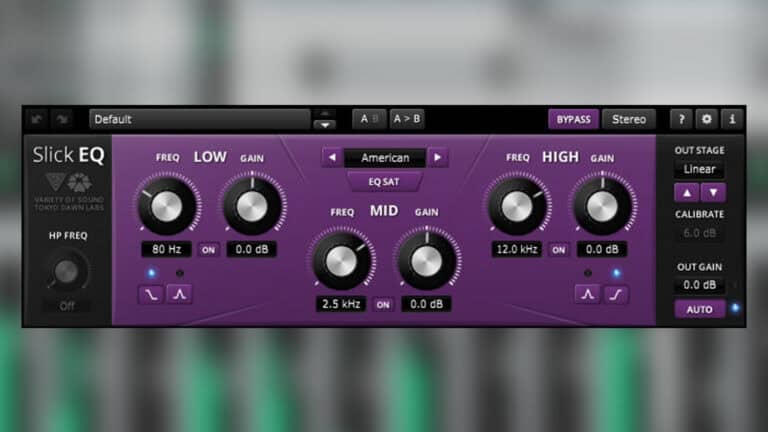
TDR VOS Slick EQ
This simple but powerful semi-parametric EQ offers four distinct EQ settings.
Pros
- 3 EQ bands with 18dB/oct high-pass filter
- 4 different EQ settings
- 5 output stages
- Advanced saturation algorithm
Cons
- Not many bands
Download from
We may earn a commission from these links.
This semi-parametric EQ might be the most versatile on this entire list. It has four bands including the high-pass filter, as well as different EQ models: British, American, German, and Soviet that all have optional linearity.
The high and low bands can be used as bell or cut filters. Output stages are also selectable via: linear, silky, mellow, deep, and toasted settings. Output gain can also be automated within the plugin to always maintain a consistent level.
Perfect for mono or stereo applications, Slick comes in VST, AU, and AAX formats.
Best linear phase free EQ plugin: Ikjb QRange
Best linear phase free EQ plugin
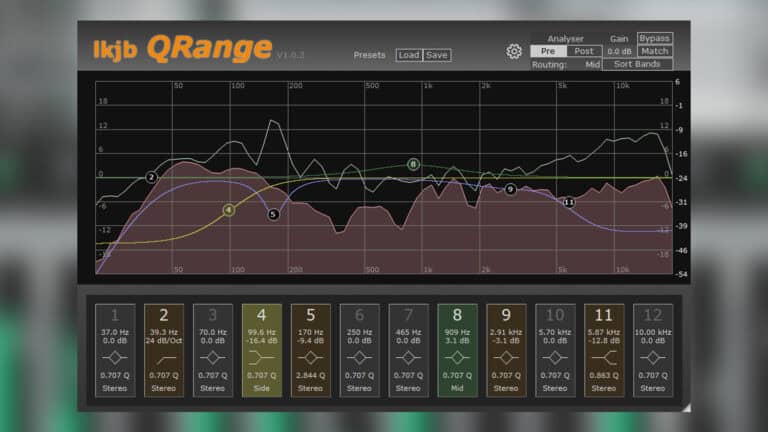
LKJB QRange
A unique take on EQ that’s worth the work but takes some time.
Pros
- 12 bands with peak, shelf, and cut filters
- Each band has stereo, L/R, and M/S mode
- Analyzer pre and post EQ settings
Cons
- Can be complicated to set up quickly
Download from
We may earn a commission from these links.
If surgical is what you’re looking for, this linear phase EQ features 12 bands that can work in stereo, mid/side, and left and right across each band. Each band has options for peak, cut filter, or shelving.
The cut filters have an adjustable curve of 12/24/48 dB per octave. The frequency analyzer has pre and post-EQ options and the GUI is scalable. You can also adjust the analyzer’s range and latency modes.
What to look for in an EQ plugin
Choose the right EQ
No single EQ plugin is ideal for every application. It’s best to have a few different EQs you can lean on depending on what you need to do.
A transparent parametric EQ may be the right choice for surgical corrective work, a vintage-style EQ may be better suited to adding character and musical tone. Dynamic EQ can solve problems that conventional filters cannot, and linear-phase processing can be useful in specialized mastering situations.
Sound quality
Technical precision is important, but the sonic character of an EQ can be just as significant.
Some plugins are designed to be transparent, which makes them useful for corrective work and mastering. Others emulate the characteristics of classic analog equalizers and introduce subtle coloration, saturation, or harmonic distortion.
Consider whether you need an EQ that just changes the frequency balance or one that also contributes a particular sonic character.
Metering
Solid metering makes an EQ plugin much easier to use. A real-time display helps identify excessive low-end energy, resonances, harsh upper-midrange frequencies, or imbalances between different parts of a mix.
Features such as adjustable analyzer resolution, pre- and post-EQ displays, and spectrum averaging can be especially useful for detailed work. Remember, visual analysis should complement critical listening rather than replace it.
FAQ
Can free EQ plugins compete with paid ones in terms of quality?
Absolutely! Freeware has come a long way, and free EQ plugins offer excellent sound quality and features. Premium plugins might offer advanced features not available in free versions, but free plugins can still provide professional-grade results.
Do free EQ plugins work with all DAWs?
Most free EQ plugins come in at least VST format, and are compatible with most DAWs. But if you use a different plugin format like AU or AAX not all of them offer those.
Can I use free EQ plugins for mastering?
One of the best things about plugins is they can be used in pretty much any way the user wants. Some are better for mixing or mastering, but generally you can use them in whatever way works best for your workflow.